Roy Chavez
CHAVEZ
AboutSkillsWorkContact
Before Audit Decisions Product System Engineering Website Process Results Reflection
← All case studies v1.0.0→v1.2.1

Pastree, rebuilt.

Pastree began as a clipboard history for the browser. A year later it's a side panel for the text, files and AI prompts people reuse, with a new brand, a new website, and a release that fixed what version 1 got wrong. I designed it, built it and shipped it.

  • Brand
  • Product design
  • Engineering
  • Website

1.2.1 is live on the Chrome Web Store ↗ (opens in a new tab) and Firefox Add-ons ↗ (opens in a new tab).

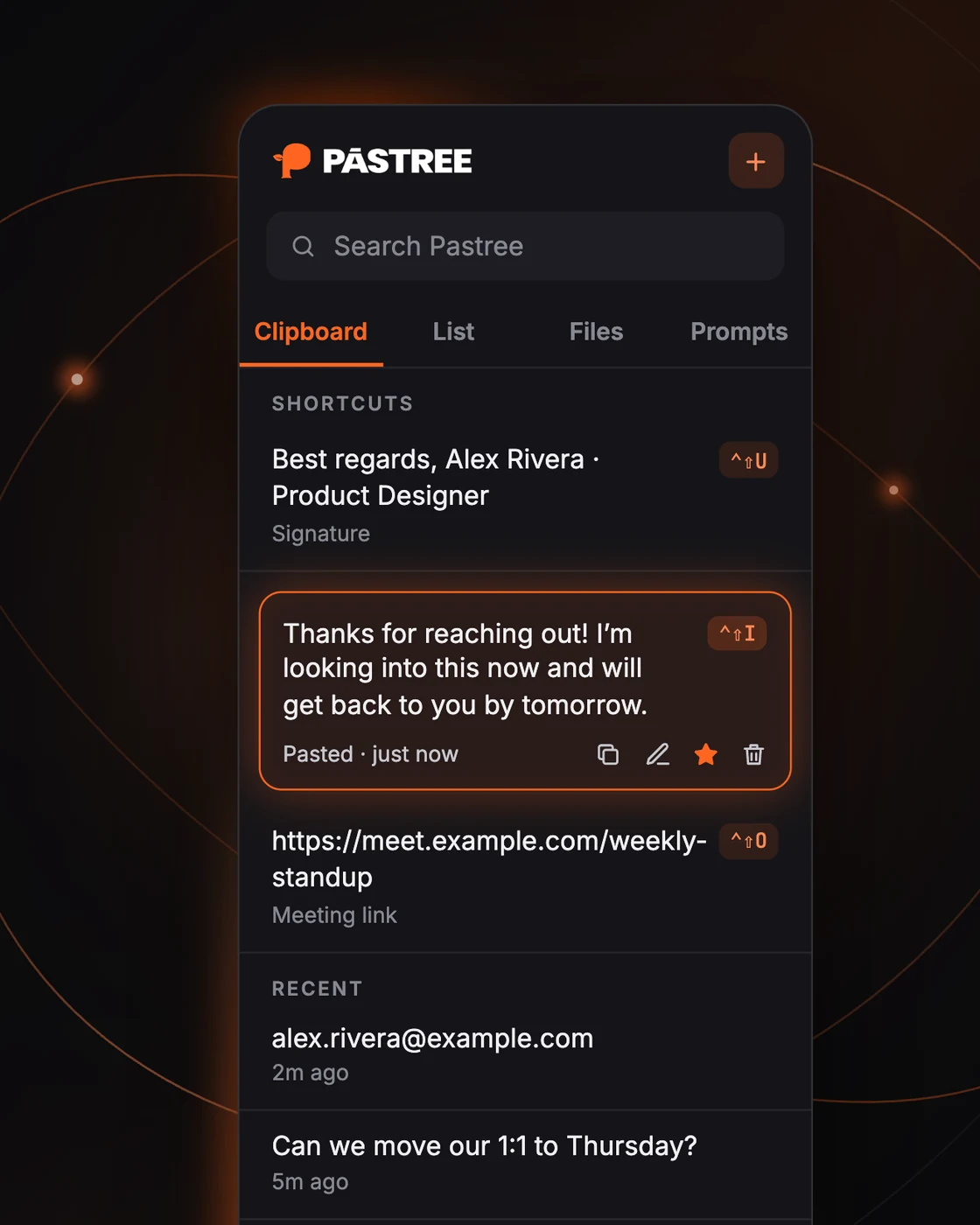
The Pastree 1.2.1 side panel in the dark theme: search, four tabs, three shortcut items with Control-Shift badges, and recent clipboard history.
Pastree 1.2.1, dark theme · sample data
Client
Digisoma (own product)
Timeline
Oct 2025 → Sep 2026
Platforms
Chrome 116+, Firefox 140+, Brave
Stack
TypeScript, Vite, MV3, Next.js 16
4tools in one panel: Clipboard, List, Files, Promptsv1 had two
55changelog entries in 1.2.0, 10 of them security fixesCHANGELOG.md
512unit tests across 47 test filessrc/**/*.test.ts
5 daysto rebuild pastr.ee from scratch, 89 commitsSep 24 → Sep 28, 2026

01 / Before and after

Same idea. A different product.

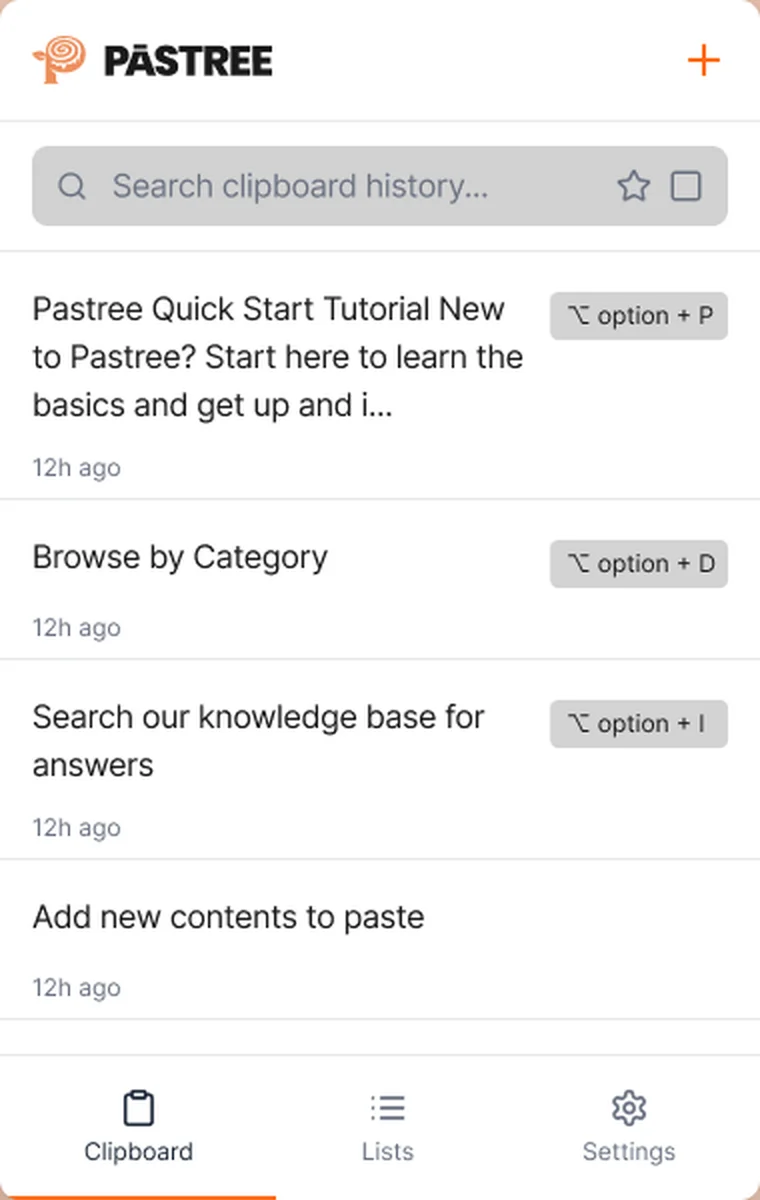
Version 1 was a popup that kept a clipboard history and three paste shortcuts. It worked, until you looked closely. Drag the handle to compare the panel then and now.

  • ShortcutsTied to list position, so every new copy moved them. Now each shortcut belongs to an item, pinned under SHORTCUTS.
  • Keys
    Option keys typed odd characters on a Mac. Now ⌃⇧U ⌃⇧I ⌃⇧O, left to right.
  • ScopeClipboard and Lists only. Now Files and Prompts too, behind one search.
  • ContainerA popup that closed when you clicked the page. Now Chrome's side panel and Firefox's sidebar, open beside your work.
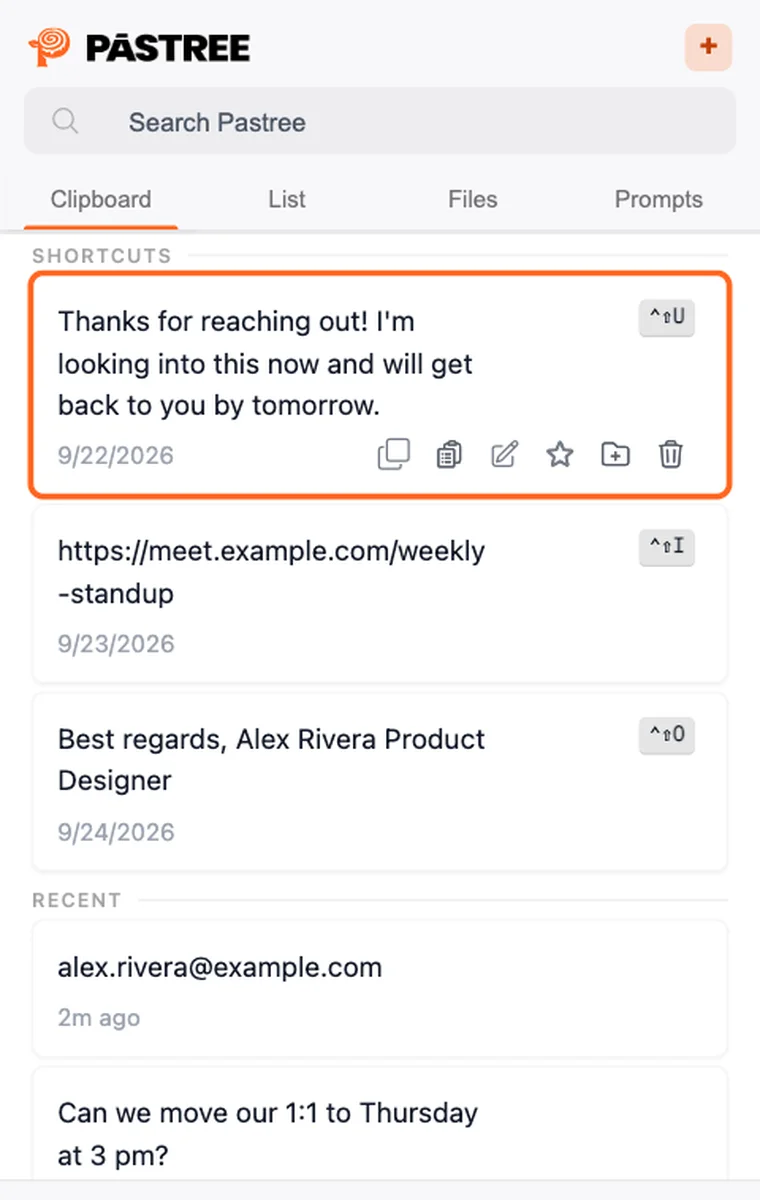
Version 1.0 panel: a clipboard list with option-key badges and bottom tabs for Clipboard, Lists and Settings. Version 1.2.1 panel: search, four tabs, a SHORTCUTS section with Control-Shift badges, and a RECENT section. v1.0v1.2.1

Drag the handle, or use the left and right arrow keys · sample data

02 / The audit

I reviewed my own v1 like a stranger's.

Before adding anything, I wrote a code review of the shipped extension and tested every setting against what its label promised. Several didn't do what they said. Those broken promises became the brief for 1.1 and 1.2.

The promise
What v1 did
What 1.2 does
“Exclude passwords”
The setting did nothing. Passwords pasted into login forms were saved.
On by default. Skips password, card and one-time-code fields, and text that looks like keys, tokens or card numbers.
“Clear All Data”
Cleared only the clipboard and lists. Deleted text stayed in a second copy.
A checklist of what to clear. Stray copies are gone, and the update removed old ones.
Paste the last three items
Every copy shifted the shortcuts, so the key you learned pasted something else.
Shortcuts bound to an item until you reassign it. Existing installs kept their bindings on update.
Automatic capture
Stopped a few seconds after the service worker went idle, and reset to off on every update.
Survives worker restarts and updates. Off until you choose to turn it on.
Light theme
Broken at the root: the gray scale existed only in dark mode.
Both themes first-class, from one token set, with contrast floors.
Delete
A dialog closed with Esc kept its handler, so the next delete removed two items.
Dialog listeners are scoped to the open dialog and torn down however it closes.

Source: CHANGELOG.md 1.1.0 to 1.2.1, docs/CODE_REVIEW.md

03 / Design decisions

Six decisions that shaped 1.2.

Each one started as a problem in how people actually use a browser, and ended as a rule the product follows.

Decision 1 · Keyboard

Shortcut keys that work on every keyboard

Problem
On a Mac, Option plus a letter types a character, so Firefox typed “π” instead of pasting. And inside text fields macOS uses ⌃⇧P to move the cursor.
Decision
New Mac keys that avoid every letter macOS reserves, running left to right across the keyboard like Alt+I, O, P on Windows. The panel always shows the keys the browser actually has, including ones the user changed.
Item 1Item 2Item 3 v1 Mac⌥P⌥O⌥I 1.2 Mac⌃⇧U⌃⇧I⌃⇧O WindowsAlt+IAlt+OAlt+P Open⌃⇧V · Alt+Shift+V (Ctrl+Shift+V is the browser's “paste as plain text”)
Decision 2 · Mental model

A shortcut belongs to an item, not a position

Problem
“Paste the most recent item” changes meaning with every copy. People memorize what a key pastes, not where it sits.
Decision
Bind each key to an item and pin those items under a SHORTCUTS heading, with RECENT below. Migrate existing installs by freezing the bindings they already had.
Decision 3 · Trust

Ask for access at the moment it's needed

Problem
An install prompt that says “read and change all your data on all websites” scares people off a clipboard tool.
Decision
Make site access optional. Pastree asks when you turn on auto-capture or first paste from the panel. Shortcuts and the right-click menu work without it.
Decision 4 · Scope

From clipboard history to a reuse workspace

Problem
What people retype isn't only text. It's the same résumé upload and the same AI prompt, every day.
Decision
Add Files, which attach straight into upload fields with no file picker, and Prompts with fill-in {audience} and automatic {{date}} variables.
Decision 5 · Defaults

Private unless you say otherwise

Problem
A tool that captures everything you copy will, sooner or later, capture a password.
Decision
Auto-capture off by default, Exclude passwords on, auto-delete that never touches starred items or lists. No accounts, no servers, no analytics.
Decision 6 · Access

Keyboard and screen reader, not just shortcuts

Problem
A keyboard-first product whose dialogs lost focus and whose icon buttons had no names.
Decision
Dialogs announce themselves, trap focus and return it. Every row button is named. Checked by hand with VoiceOver in Chrome and Firefox.
Also in 1.2

Bulk actions and search everywhere

Added
Select cards with click, shift-click and ⌘-click, then Star, Add to List or Delete in one step. Search now covers the List tab with highlighted matches.

04 / The product

Everything you reuse, beside the page.

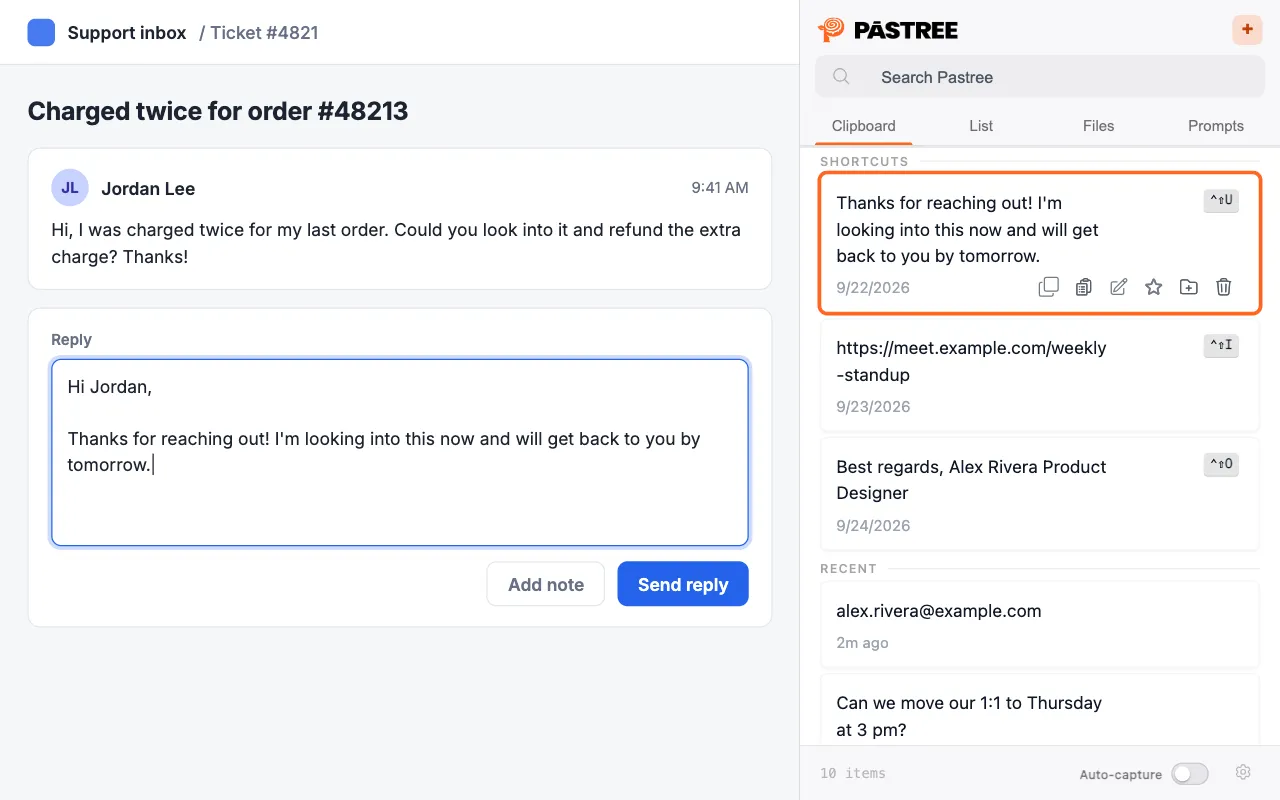
Pastree Clipboard tab beside a sample web page

Clipboard tab, light theme · sample data

Clipboard

Everything you copy on the web, searchable, with your three shortcut items pinned on top.

  • Shortcut items 1–3 pinned under SHORTCUTS
  • Auto-capture off until you turn it on
  • Star, list, edit, paste or delete from each card
  • Select several and act on them at once
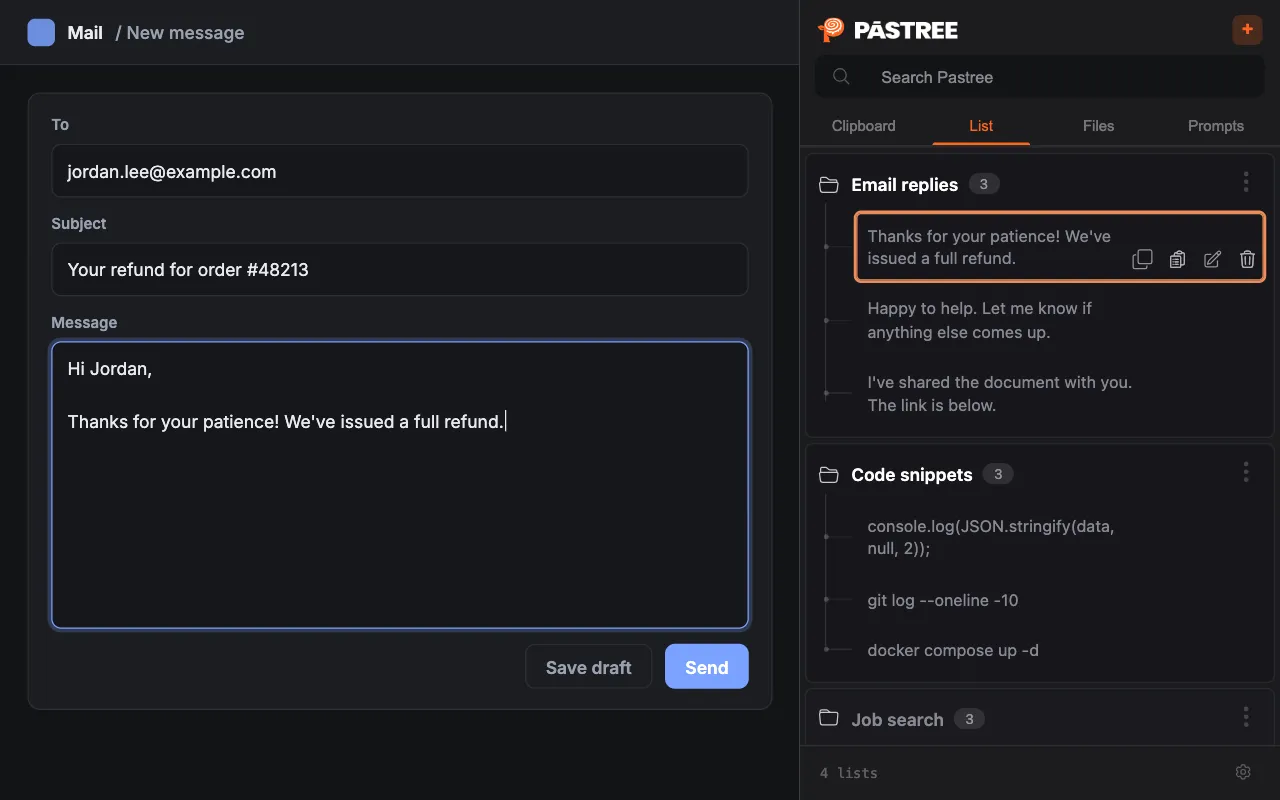
Pastree List tab beside a sample web page

List tab, dark theme · sample data

List

Group the snippets you reuse by what they are for: application answers, support macros, bios.

  • Lists shown as a tree, navigable with arrow keys
  • Add from history in one click
  • Paste list items from the right-click menu
  • Search finds lists and items, with highlights
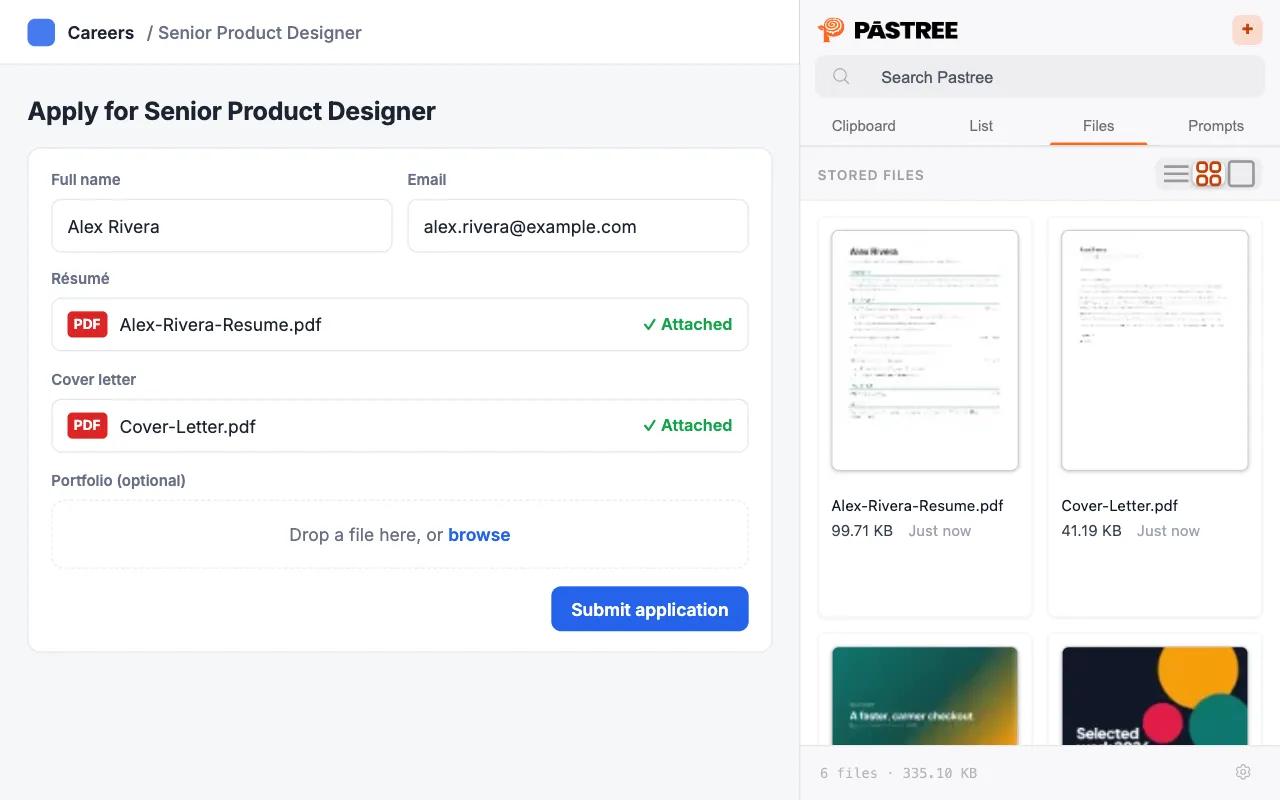
Pastree Files tab beside a sample web page

Files tab, light theme · sample data

Files

Keep your résumé and other documents in the panel and attach them to upload fields without opening a file picker.

  • PDF, DOC, DOCX, TXT, MD, RTF, ODT and images
  • Up to 50 files, 20 MB each
  • List, grid and thumbnail views
  • Works with drop zones and forms inside iframes
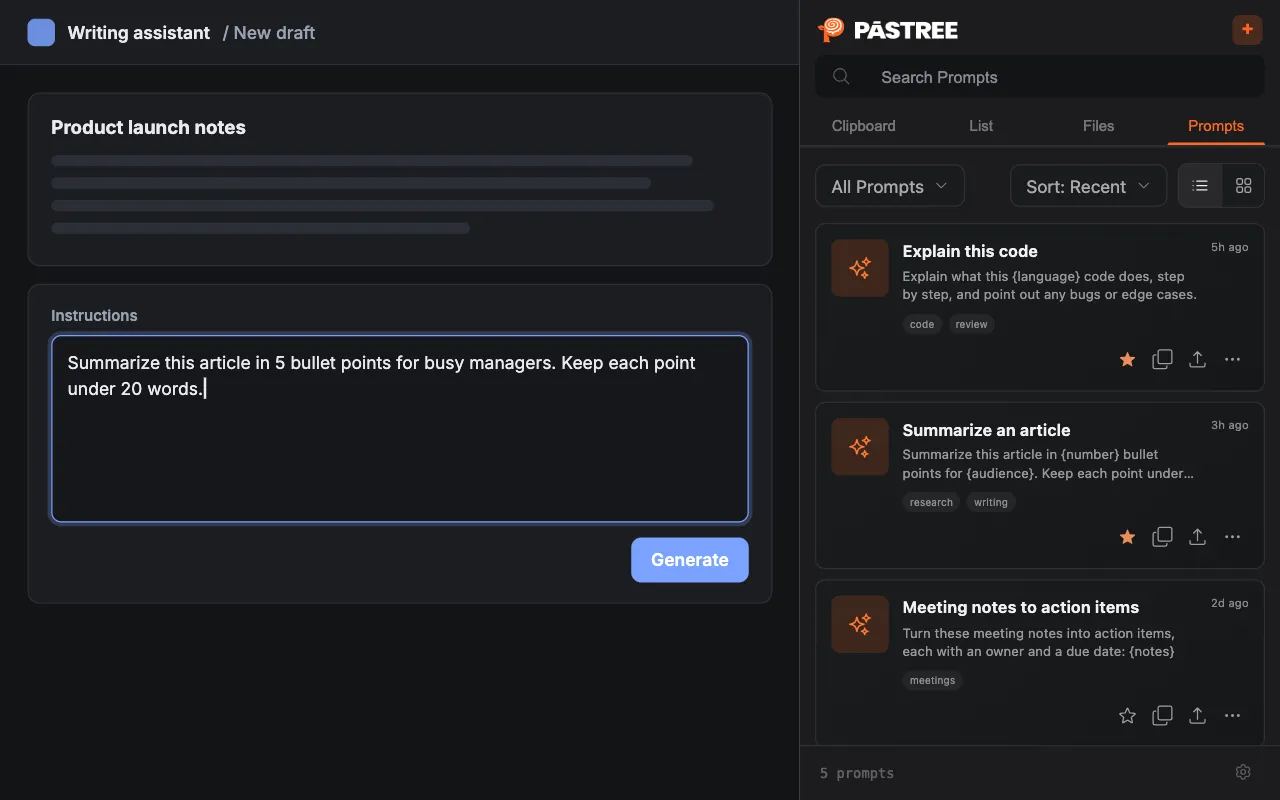
Pastree Prompts tab beside a sample web page

Prompts tab, dark theme · sample data

Prompts

Save the prompts you use with AI tools as templates, then fill in the blanks and copy.

  • Fill-in {variables} and automatic {{date}}, {{clipboard}}
  • Up to 20 versions, with compare and restore
  • Tags, lists, favorites and pinning
  • Pastree connects to no AI service
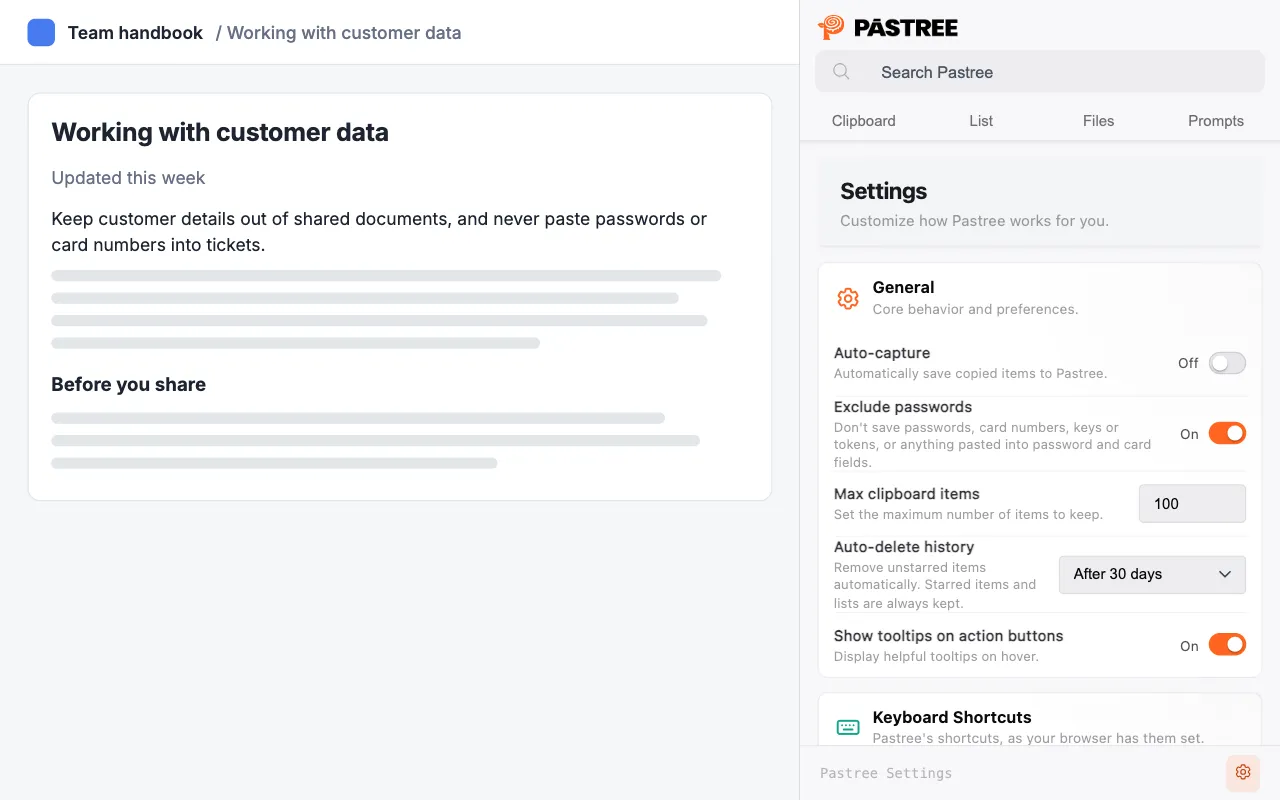
Pastree Settings tab beside a sample web page

Settings, light theme · sample data

Settings

Privacy and retention controls written in plain language, with safe defaults.

  • Exclude passwords on by default
  • Auto-delete never touches starred items or lists
  • Clear All Data as a checklist
  • Every shortcut listed with the keys your browser has

05 / Brand and design system

One token set, two first-class themes.

I designed the Pastree mark, wordmark and palette, then rebuilt the extension's styles so light and dark come from the same tokens. The panel was first drawn from dark mockups, with about 300 hardcoded white-on-dark values that vanished on a light background.

An ink channel instead of 300 literals

--ink is a bare RGB triple, so any surface can take it at any strength. A contrast floor stops secondary text from dropping below what each theme can read.

/* light */
--ink: 26 26 32;
--ink-floor: 64%;  /* dark: 52% */

/* at the use site */
color: rgb(var(--ink) / max(40%, var(--ink-floor)));

Brand orange, split by job

Pastree orange is 2.9:1 on white: fine for fills, too faint for text. Text and icons on light surfaces use a deeper orange; fills and the logo keep the true brand color.

Aa
#FF6520
fill · 6.7:1 w/ ink
Aa
#B63D0B
text on light · 5.7:1
Aa
#FF6520
text on light · 2.9:1 ✕
Aa
#0A0A0C
ground · 17.4:1

06 / Engineering

Built for browsers that stop your code without asking.

Manifest V3 service workers are shut down whenever the browser likes. Tabs come and go. Chrome and Firefox disagree on panels, permissions and keys. The architecture is built around those facts.

Architecture: content scripts on web pages send messages to the service worker, which routes them through a serial queue to local storage and IndexedDB. The side panel talks to the same service worker.

Web page clipboard-monitor sensitive-fields file-attach (on demand) Service worker message-router serial-queue context menu · commands sender checks auto-delete alarm Side panel / sidebar Clipboard · List Files · Prompts Settings storage.local history · lists prompts · settings IndexedDB files (20 MB each) PDF thumbnails copy events messages one write at a time

Capture died when the worker slept

SymptomAuto-capture stopped a few seconds after the browser idled the service worker.

CauseOrphan detection used a runtime port. An idle MV3 worker drops every port, which looked the same as an extension reload, so every tab tore down its listeners.

FixDetect orphans with runtime.id, which survives worker restarts, and retry cold-start messaging errors instead of treating them as fatal.

Copy twice, and the item can't be deleted

SymptomCopying the same text again made that item impossible to delete, edit or star.

CauseDe-duplication wrote a new timestamp to the item but not to the index, so every lookup missed.

FixThe index tracks the item it points at, and lookups fall back to a scan, so installs that already drifted repair themselves on first use.

Races between capture and delete

SymptomA capture landing during a delete could bring the deleted item back, or be lost.

CauseConcurrent read-modify-write cycles on the same storage keys.

FixA serial queue in the service worker, so storage writes run one at a time, covered by its own tests.

Web pages could ask to wipe your data

SymptomThe background script accepted clear, import and overwrite requests from any sender.

CauseNo check on who sent a message, and imported backups could write any setting.

FixDestructive requests are accepted only from Pastree's own pages. Imports are validated, and file names render as text, never markup.

136commits up to v1.2.1first: 2025-10-12
512unit testsVitest
2store builds from one sourceChrome MV3 · Firefox
0network requests from the extensioneverything stays on device

What went into 1.2.0

55 changelog entries, released Sep 28, 2026

25 15 10 4
  • Fixed 25
  • Changed 15
  • Security 10
  • Added 4
  • Removed 1

07 / pastr.ee

A new website, built from scratch.

The old site said “Supercharge your clipboard” and described things Pastree no longer offers, such as open source code. I rebuilt it around one line, “Stop retyping yourself.”, real scenarios, and the product's own UI as the main image. Every claim was checked against a single product-facts file taken from the code.

pastr.ee
The pastr.ee home page at desktop width: a hero with Add to Chrome and Get it for Firefox buttons, problem and fix cards, a tour of the panel, use cases, privacy, getting started with keyboard shortcuts, common questions and a final call to action with both store badges.

Scroll inside the frame · 1440 px build

The pastr.ee home page at phone width.

390 px build

  • Next.js 16 static export, over 20 pages, hosted on AWS Amplify
  • Automated WCAG 2.2 A/AA checks pass on every content page
  • No horizontal overflow at 320, 390, 768, 1024, 1280 and 1440 px
  • Reduced motion stops every animation, including the hero
  • Four use-case pages and a full support guide set
  • Cookieless analytics, no ads, fonts self-hosted

08 / How one person shipped all of it

I direct, specify and verify. Agents speed up the typing.

A solo designer-engineer ships three products at once by being strict about inputs and checks. I used AI coding agents for implementation, inside a process where the design calls and the final review stayed mine.

  1. Specify

    A plan per piece of work, with decisions, scope and acceptance criteria, written before any code.

  2. One source of truth

    A product-facts file, checked against the code, that every line of website and store copy is tested against.

  3. Build in small steps

    Designer, developer and QA passes on a branch, one checkpoint commit per phase.

  4. Verify by hand

    Lint, types, 512 tests and axe on every change, then keyboard, VoiceOver, Windows and Brave checks by hand.

09 / Results

Shipped, and still shipping.

1.2.1 is live on the Chrome Web Store ↗ (opens in a new tab) and Firefox Add-ons ↗ (opens in a new tab).

1.2.1live on Firefox Add-onsSep 29, 2026
1.2.1live on the Chrome Web StoreSep 29, 2026
Livepastr.ee, the rebuilt websiteChrome and Firefox

10 / Reflection

What I'd tell myself at v1.

Test the labels, not just the code

The worst v1 bugs were settings that showed a switch and did nothing. Now I check every setting against what its label promises before a release.

Design for the platform's rules

Keyboard shortcuts, permissions and panel focus are owned by the browser and the OS. The good decisions in 1.2 came from reading those rules first.

Write the facts down once

A single facts file kept the extension, the store listings and the website saying the same true things, and caught copy that had drifted.

Next

Stop retyping. Start reusing.

Pastree is free, needs no account, and keeps everything in your browser.

Visit pastr.ee ↗ (opens in a new tab) Get it for Chrome ↗ (opens in a new tab) Get it for Firefox ↗ (opens in a new tab)
Roy Chavez
CHAVEZ

Navigate

  • About
  • Skills
  • Work
  • Contact

Resources

  • Resume
  • Case Studies
  • Posts
  • Design Process

Connect

  • LinkedIn

© 2026 Roy Chavez. All rights reserved.

Privacy Policy